


Bread Financial
4.73.12K Reviews
App Specs
- Version
- 5.8.2
- Updated On
- License
- Free
- Downloads
- 500,000+
- Developer
- Bread Financial Holdings, Inc.
- Categories
- Finance
- Platform
- Android
Screenshots


 Analysis by AppCompare
For a household, money management often means several people trying to keep track of different accounts, bills, and spending without crossing boundaries. I see Bread Financial as a focused finance app for managing an account and handling payments and rewards while away from home—not as a shared household dashboard. That distinction matters: it can be useful when one person is responsible for a particular account, but it should not be mistaken for a tool that combines everyone’s finances or coordinates access between family members.
One account, one clear responsibility
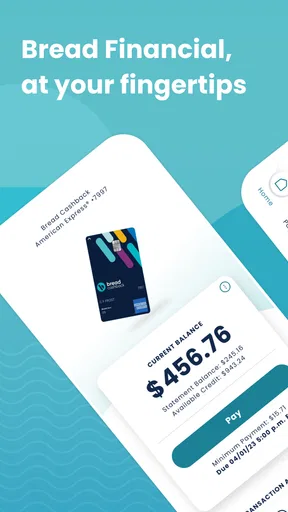
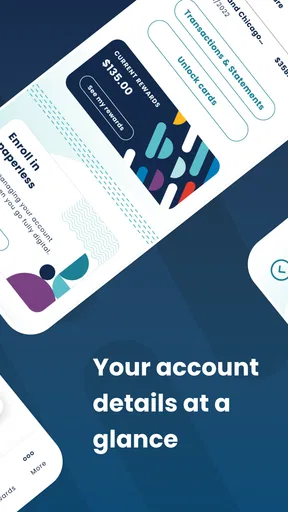
Picture a familiar situation: you’re out running errands, remember a payment is due, and want to check the account before deciding what to do. A mobile account app can make that task less awkward than waiting until you are back at a computer. Bread Financial’s stated focus is managing an account, making a payment, and redeeming rewards on the go. I’d judge it by how well it supports those specific jobs, rather than expecting a full picture of a household’s spending.
That narrower role can be a real advantage. If you use an account associated with Bread Financial and want a convenient way to check in on it, a dedicated app may be simpler than opening a general budgeting service and trying to connect several financial providers. It also gives you a natural place to review account activity before acting. The trade-off is that another person’s account, or the family budget as a whole, does not automatically become part of that view.
Set boundaries before you hand over a phone
I would treat the app as personal account access, not as a shared family utility. If a partner or relative needs to help with a payment, agree on who is signing in and who is responsible for confirming the amount and timing. Avoid passing around account credentials simply because the phone happens to be nearby; convenience is not a substitute for clear permission or safe account practices.
This is especially worth thinking through on a shared device. A phone used by several people can leave account screens within reach of someone who does not need them, and saved sign-in details can make that boundary less obvious. I’d keep the app on a device whose regular user is the account holder, use the device’s own security features, and sign out or otherwise secure access when appropriate. Those are sensible habits for any financial app, not special controls I would assume Bread Financial provides.
Coordinate payments without confusing the record
When two adults share household expenses, the most useful arrangement may be to decide which person handles this account and how the other person will know a payment was made. A shared calendar or a brief message can cover coordination without turning one login into a substitute for a household process. For example, one person can check the amount and submit the payment, then tell the other that the task is done; both people can keep their own records of shared costs.
That workflow also helps avoid a common point of friction: two people both assuming the other has paid. Before confirming a transaction, I’d check the relevant account details and make sure the payment is being made from the intended account. If your household needs joint visibility, multiple user roles, or a combined account overview, look for a service specifically designed for those needs rather than expecting a single-account app to provide them.
Worth Reading Before You Choose

EA SPORTS FC Mobile 26 Is a Bigger Football Game, but It Takes Time

Flipboard Shows What News Apps Must Do Beyond the Feed

Switching to Android Auto Means Rethinking Your Driving Routine

Google Calendar Makes a Crowded Week Easier to Manage

Ludo King Makes the Most of the Minutes Between Plans

Baby Panda World Brings Quick Play to Modern Phones, but Its Game Library Feels Busy
Age, trust, and account ownership
The app is rated for Everyone, but an age rating is not the same thing as permission to use someone else’s financial account. I would keep the account holder in control, particularly when a younger family member uses the same phone. A child might be able to navigate a device, but that alone does not make it appropriate to share financial credentials or let them make account decisions.
For a household, trust is less about giving everyone access and more about agreeing on what each person is responsible for. If someone else needs to make a payment on the account, clarify the task and confirm the result with the account holder. If you need formal shared access or a way to manage a dependent’s finances, check the account provider’s arrangements directly; I would not infer those options from the app itself.
As a finance app from Bread Financial Holdings, Inc., Bread Financial is free to install and has a 4.7 average from around 33,000 ratings. It has over 500,000 installs, and its Everyone age rating makes it broadly suitable as an app listing, while account use should still stay with the appropriate account holder. Those figures suggest that many people use it, but they don’t tell me whether it fits a household that needs shared controls. My practical test is simpler: does the person responsible for the account want a mobile place to manage it and its rewards?
Getting Started with Bread Financial
First things first, downloading Bread Financial is a breeze. Available for both Android and iOS, it takes just a few taps to get it running on your device. Once installed, you're greeted with a clean and intuitive interface that makes navigation a piece of cake. I mean, who doesn’t love a user-friendly design, right?
The setup process is straightforward. You’ll need to link your bank accounts, credit cards, and other financial institutions to get the most out of the app. Don’t worry, the app uses top-notch security measures to ensure your data stays safe. Within minutes, you’ll have a complete overview of your financial landscape right at your fingertips.
Features That Stand Out
What sets Bread Financial apart from the crowd? Well, it’s packed with features that cater to both financial novices and seasoned money managers. Here are a few worth highlighting:
- Budgeting: The app lets you set up customizable budgets to keep your spending in check. You can allocate funds to different categories and track your expenses against these budgets in real-time.
- Bill Management: Never miss a bill payment again! Bread Financial sends you timely reminders and even allows you to pay bills directly through the app.
- Goal Setting: Have a financial goal in mind? Whether it’s a vacation, a new gadget, or just saving for a rainy day, you can set and track your progress towards achieving it.
One feature I particularly appreciate is the spending insights. The app provides detailed reports on your spending habits, helping you identify areas where you can cut back. It’s like having a financial advisor right in your pocket!
Personal Experience
After using Bread Financial for a few weeks, I must say it’s been a game changer for me. The app’s ability to streamline all my financial information into one place is incredibly convenient. I no longer have to switch between different apps to get a complete picture of my finances.
The budgeting tool is my favorite feature. It’s helped me curb unnecessary spending and stick to my financial plans more effectively. Plus, the app’s reminders ensure that I never miss a bill payment, which is a lifesaver for someone as forgetful as me.
Is Bread Financial for You?
So, should you give Bread Financial a try? If you’re looking for a comprehensive financial management tool that’s easy to use and packed with features, then absolutely. It’s particularly great for anyone who wants to get a better grip on their spending and saving habits. The app’s ability to offer personalized insights into your finances is an added bonus.
However, if you’re someone who prefers having separate apps for different financial tasks, or if you’re not comfortable with linking all your financial accounts in one place, then you might want to weigh your options. But for most of us, the convenience and functionality that Bread Financial offers are hard to beat.
In conclusion, Bread Financial is a solid choice for anyone looking to simplify their financial life. Its user-friendly interface, robust features, and insightful analytics make it a standout in the crowded world of financial apps. So why not give it a whirl and see how it can help you achieve your financial goals?
Choosing the right kind of finance app
The best comparison is not necessarily with another app that has a longer list of budgeting tools. It is with the way you already handle the account. If you normally open a mobile browser or wait until you are at a computer to check a payment or redeem rewards, a dedicated app can make those account-specific tasks easier to reach. If your main goal is to see balances across unrelated banks, set household-wide spending limits, or compare every bill in one place, a general personal-finance manager may be a better fit.
I would also separate account servicing from financial planning. An app that helps with a particular account can be useful without replacing a spreadsheet, a shared budget, or a banking app you use for everyday transactions. Keeping those roles distinct can make records easier to understand: use the account app for its own activity and rewards, and use your chosen household method for expenses that involve several people.
Small habits that make mobile account management easier
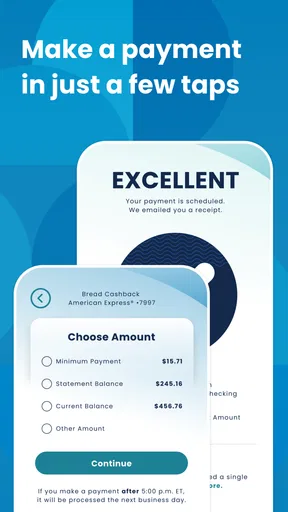
Before making a payment while distracted, I’d pause long enough to verify the account and amount, then check the confirmation or account activity afterward. That simple two-step routine is more useful than treating a reminder as proof that a payment has gone through. It also gives you a clear answer if another household member asks whether the task is complete.
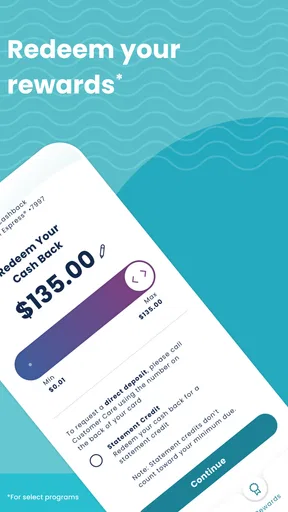
Rewards are another reason to check in, but I would avoid redeeming them impulsively just because the option is convenient. First decide whether you want to use them for the current need or save them for later, then review the redemption details before confirming. The useful habit is to treat rewards as part of the account’s value while still making a deliberate choice; convenience alone does not tell you whether a redemption is worthwhile for your plans.
If you are deciding whether the app belongs on your phone, consider how often you handle this specific account and whether on-the-go access solves a real annoyance. It is a stronger choice for someone who wants to check and manage a Bread Financial account directly than for someone searching for a complete view of all household finances. On Android, the listed minimum operating system is version 11, and the current version is 5.5.2, so it is worth checking that your device meets the requirement before you plan around the app.
A practical household verdict
I’d recommend Bread Financial to the account holder who wants a convenient mobile route to account management, payments, and rewards, and who is comfortable keeping that access personal. It is less compelling for families seeking shared logins, formal coordination features, or a single dashboard for every person’s finances. In those cases, a household budget tool or a provider’s own shared-account arrangement may suit the job better.
The key question is not whether one app can do everything; it is whether this app makes the account tasks you actually handle less cumbersome. For a single responsible user, that focused role can be enough. For a shared household, pair it with clear communication and a separate method for joint expenses, and do not treat the Everyone rating as a reason to share financial access. That is the approach I’d take: use the app for the account, keep ownership clear, and choose a broader tool only if the household needs broader visibility.
Pros
- User-friendly interface with intuitive navigation.
- Offers real-time financial tracking and updates.
- Secure encryption for safe transactions.
- Customizable financial goals and alerts.
- Integrates seamlessly with multiple bank accounts.
Cons
- Limited customer support options available.
- Occasional syncing issues with certain banks.
- Premium features behind a paywall.
- No offline access to account information.
- Requires frequent updates for optimal performance.
FAQs for Bread Financial
What is Bread Financial and how does it work?
Bread Financial is a digital platform providing financial solutions such as loans, credit cards, and payment options. It works by allowing users to apply for financial products directly through the app, offering a convenient way to manage finances on the go. The app features an intuitive interface for viewing balances, making payments, and tracking spending.
Is Bread Financial secure to use for online transactions?
Yes, Bread Financial employs robust security measures to ensure user data is protected. The app uses encryption technology for all transactions and personal information, and regular security updates are applied to safeguard against vulnerabilities. Users are also encouraged to enable two-factor authentication for an added layer of security.
What are the eligibility requirements for using Bread Financial services?
To use Bread Financial services, users typically need to be at least 18 years old and a resident of a supported country. Additionally, a valid identification document is required during the application process. Creditworthiness will also be assessed based on the applicant's credit history and financial background.
Are there any fees associated with Bread Financial services?
Bread Financial may charge fees depending on the specific service or product. For instance, credit cards can have annual fees, late payment fees, or interest charges. It's important to review the terms and conditions for each product to understand any associated costs before proceeding.
How can I contact customer support if I encounter issues with Bread Financial?
Bread Financial offers multiple customer support channels, including in-app chat, email, and a dedicated phone line. Users can access support options through the app’s help section to resolve issues or get answers to their questions. Response times vary, but the team aims to assist users promptly.


